What does SRT stand for?
SRT stands for SubRip Subtitle, sometimes expanded as SubRip Text. The name comes from SubRip, a free Windows program that pulled subtitles out of video into text files, and the extension kept its initials.
The SRT meaning differs elsewhere: Street and Racing Technology is a Dodge performance brand, and Secure Reliable Transport is a streaming protocol. This guide covers only the subtitle file, the thing people mean when they ask what is an SRT file.
SRT file format: what each subtitle block contains
Every block, called a cue, has four parts in a fixed order, and a missing part breaks the whole block:
- Sequence number: starts at 1 and goes up by one in playback order.
- Timecode line:
HH:MM:SS,mmm --> HH:MM:SS,mmm, the start and end time to the millisecond, with spaces around the arrow. - Subtitle text: one or two lines shown together.
- Blank line: closes the block; without it, two blocks merge into one.
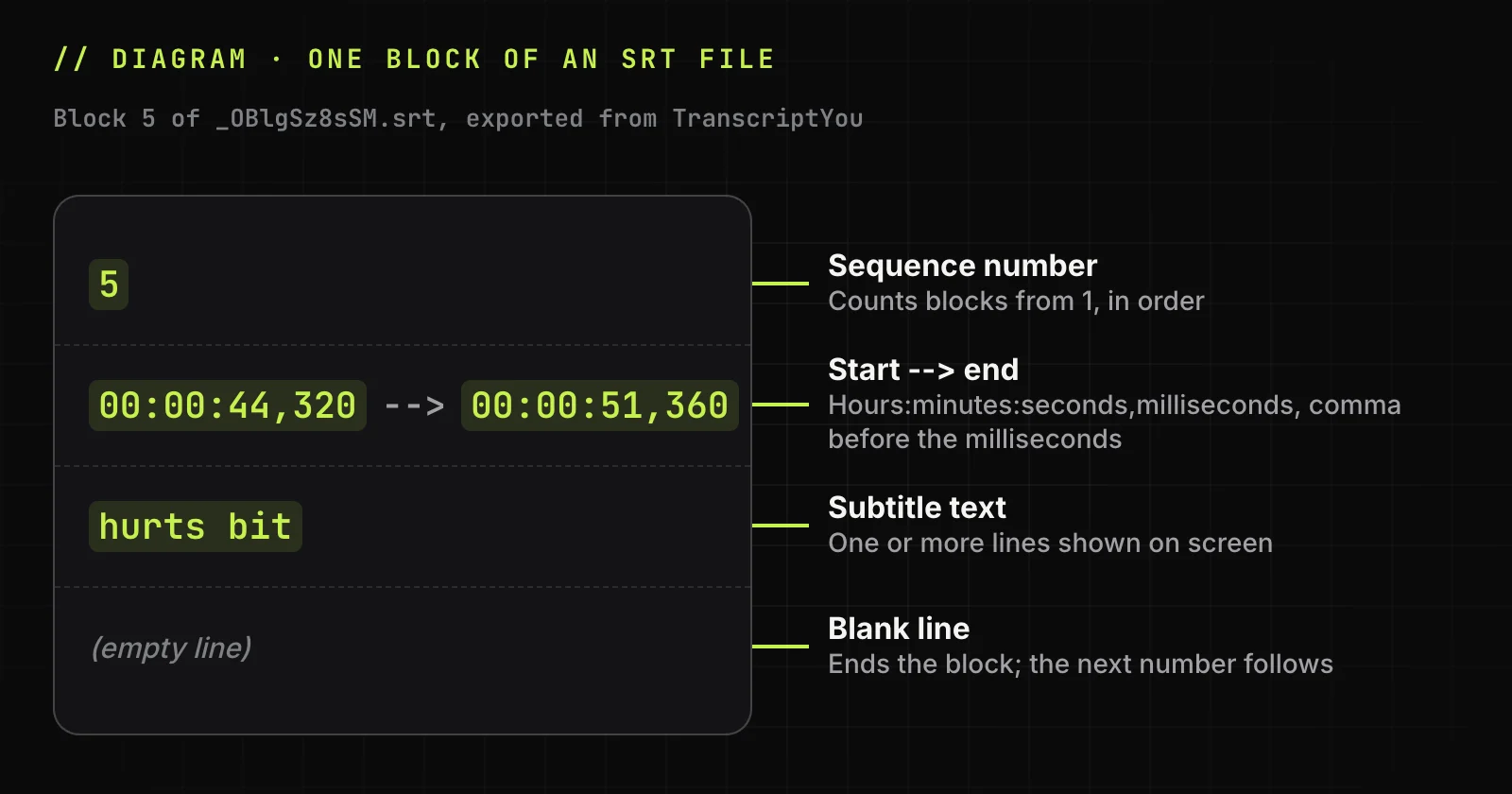
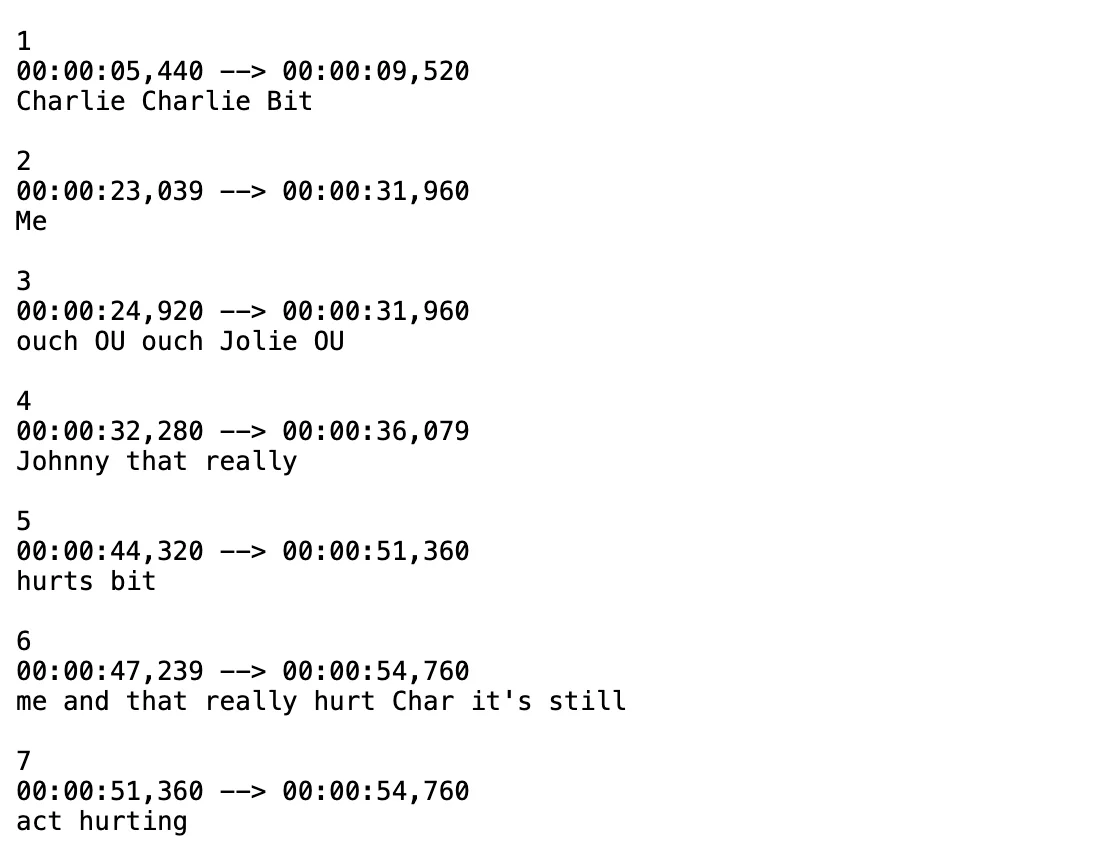
Below are blocks 5-7 of our TranscriptYou export of the public video "Charlie bit my finger - again !" (5 November 2026). It has only YouTube's automatic captions, so the text is raw, unedited speech recognition:
5
00:00:44,320 --> 00:00:51,360
hurts bit

6
00:00:47,239 --> 00:00:54,760
me and that really hurt Char it's still

7
00:00:51,360 --> 00:00:54,760
act hurting
The SRT format puts a comma before the milliseconds, where WebVTT uses a full stop. Hours are always written, even as 00. Save as UTF-8, or é and ü turn into stray symbols. Tags such as <i> or <font color> are allowed, but whether they render depends on the player.
What SRT files are used for
SRT files carry subtitles and closed captions as a separate file that viewers switch on or off; closed captions also describe sounds for viewers who are deaf or hard of hearing. Unlike captions burned into an MP4, SRT subtitles can be fixed without exporting the video again.
Typical uses of SRT files are accessibility, watching with the sound off, and translation, with one .srt file per language. YouTube accepts SubRip uploads, and for a video already there you can download YouTube subtitles in any language it carries.
Need an SRT file from a YouTube video?
Paste a YouTube link and download its subtitle track with the original timecodes. Free, no sign-up.
How to open an SRT file
Any text editor opens an SRT file because it is plain text; to see the subtitles on a video, load the file in a media player such as VLC media player.
Read or edit the text in Notepad or TextEdit
On Windows, Notepad or any text editor shows the blocks as they are. On a Mac, TextEdit opens SRT files as plain text: our export opened on macOS 15 with all 356 characters intact.
-
Open the file
In TextEdit, choose File ‣ Open and select the subtitle file.
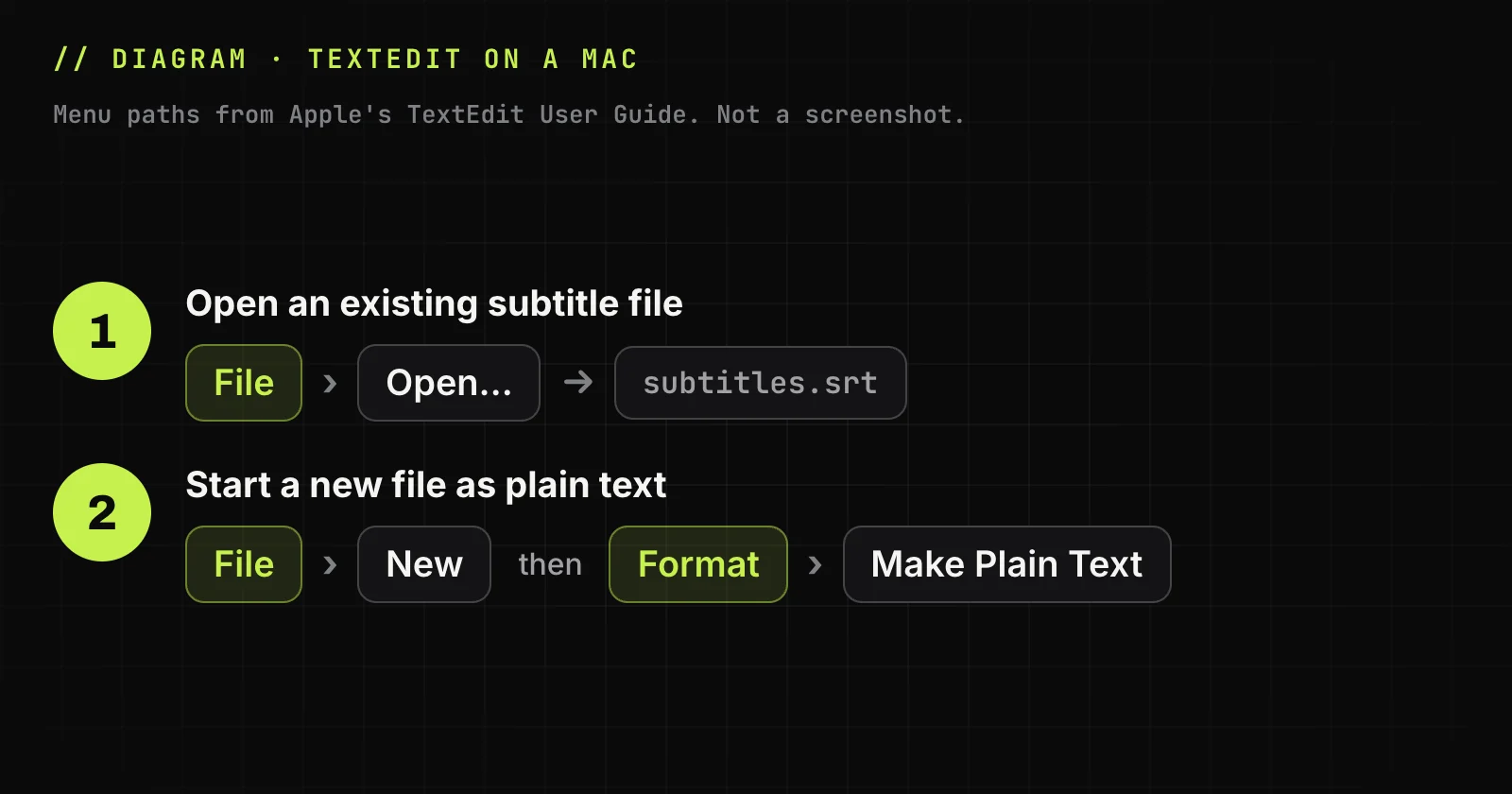
Diagram: TextEdit menu paths from Apple's user guide. -
Start a new file as plain text
Choose File ‣ New, then Format ‣ Make Plain Text.
Play subtitles with a video in VLC
VLC media player shows SRT files over the video it plays. Steps from the VideoLAN documentation for VLC 3.0:
-
Open Multiple Files
Click Open Multiple Files…
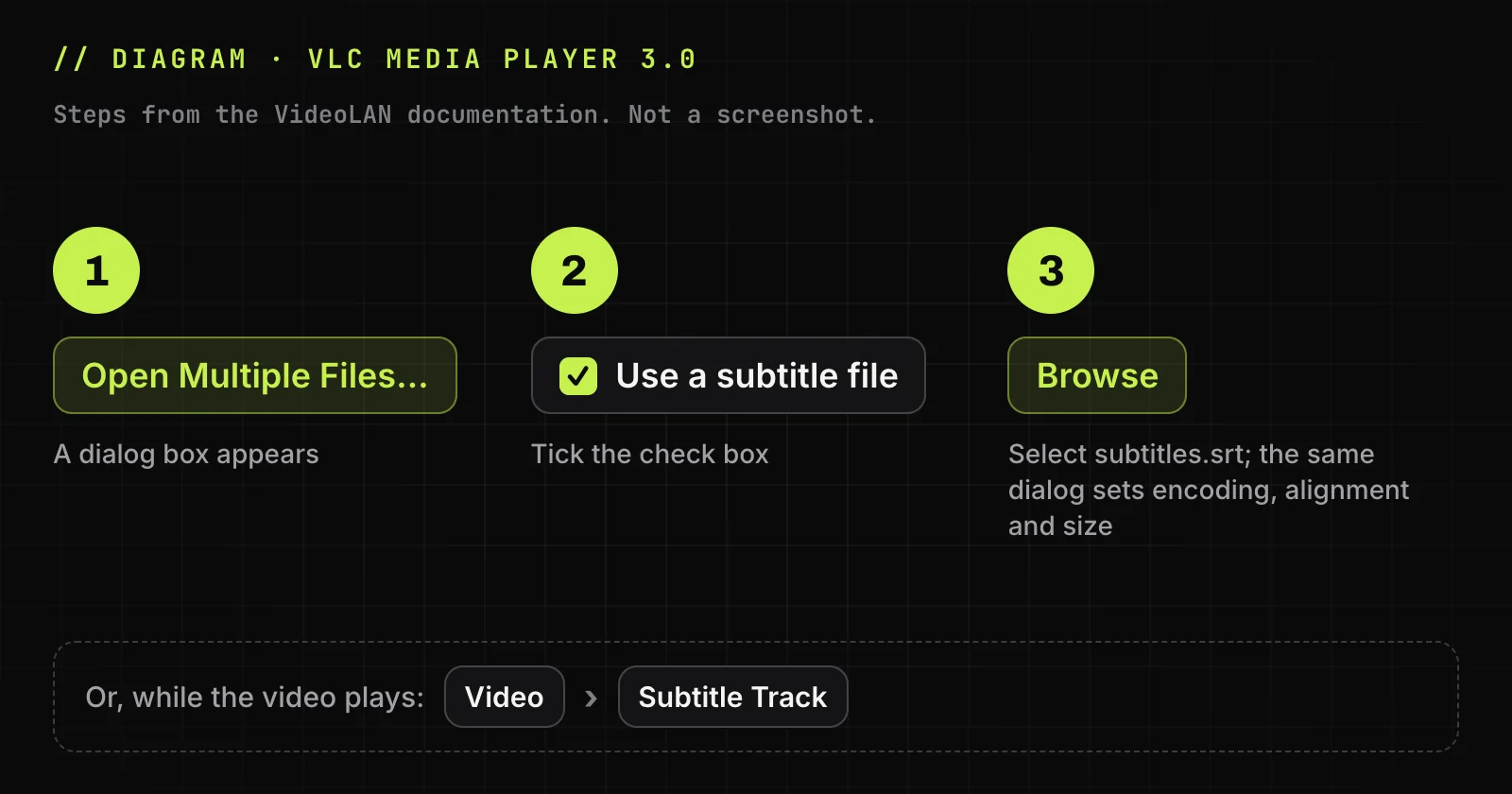
Diagram: loading subtitles in VLC 3.0, from the VideoLAN documentation. -
Tick the check box
Tick Use a subtitle file.
-
Pick the file
Click Browse and select it. The dialog also sets encoding, alignment and size.
Or use the Video ‣ Subtitle Track menu while the video plays.
Import the file into a video editor
Video editors with caption support import a subtitle file as a captions track on the timeline.
How to create an SRT file
Write the file by hand, export it from a video's existing captions, or time it in a subtitle editor for long videos.
Write an SRT file by hand
-
Start a plain-text file
Use Notepad on Windows or a plain-text TextEdit file on a Mac.
-
Type the blocks
Number, timecode line, text and a blank line, numbered from 1.
-
Save as UTF-8
Pick UTF-8 if the dialog offers an encoding, and check that the editor did not add .txt to the name.
Export an SRT file from existing captions
For a public YouTube video with captions, you can convert a YouTube video to SRT with TranscriptYou. TranscriptYou has no speech recognition of its own: it takes the creator's track or YouTube's automatic one.
-
Paste the link
Paste the YouTube link into the form and press the convert button.
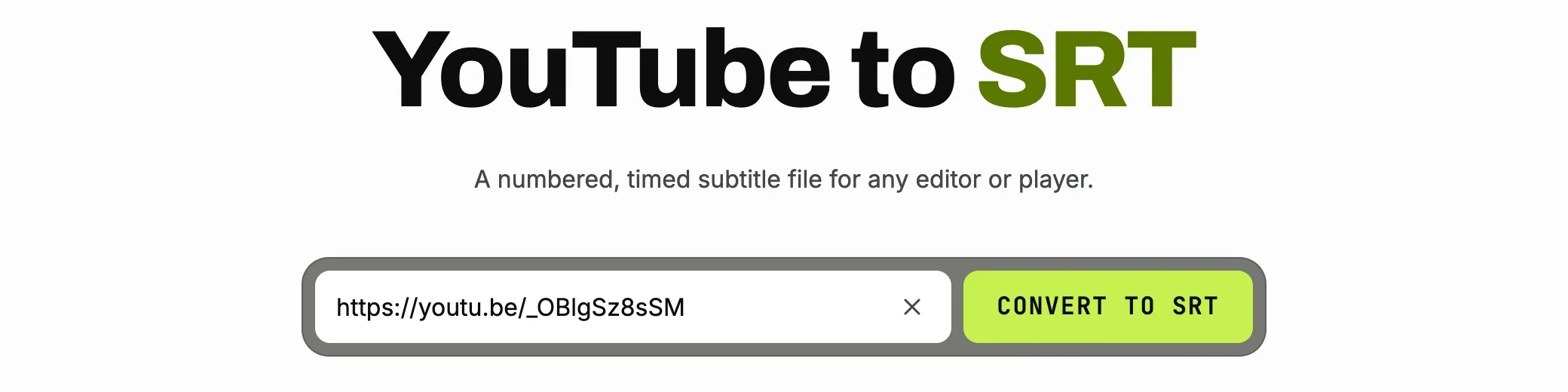
Screenshot: a YouTube link pasted into the TranscriptYou YouTube to SRT form. -
Check the track and download
Here the track is English (auto), YouTube's automatic captions. Check the format next to Download and save the file.
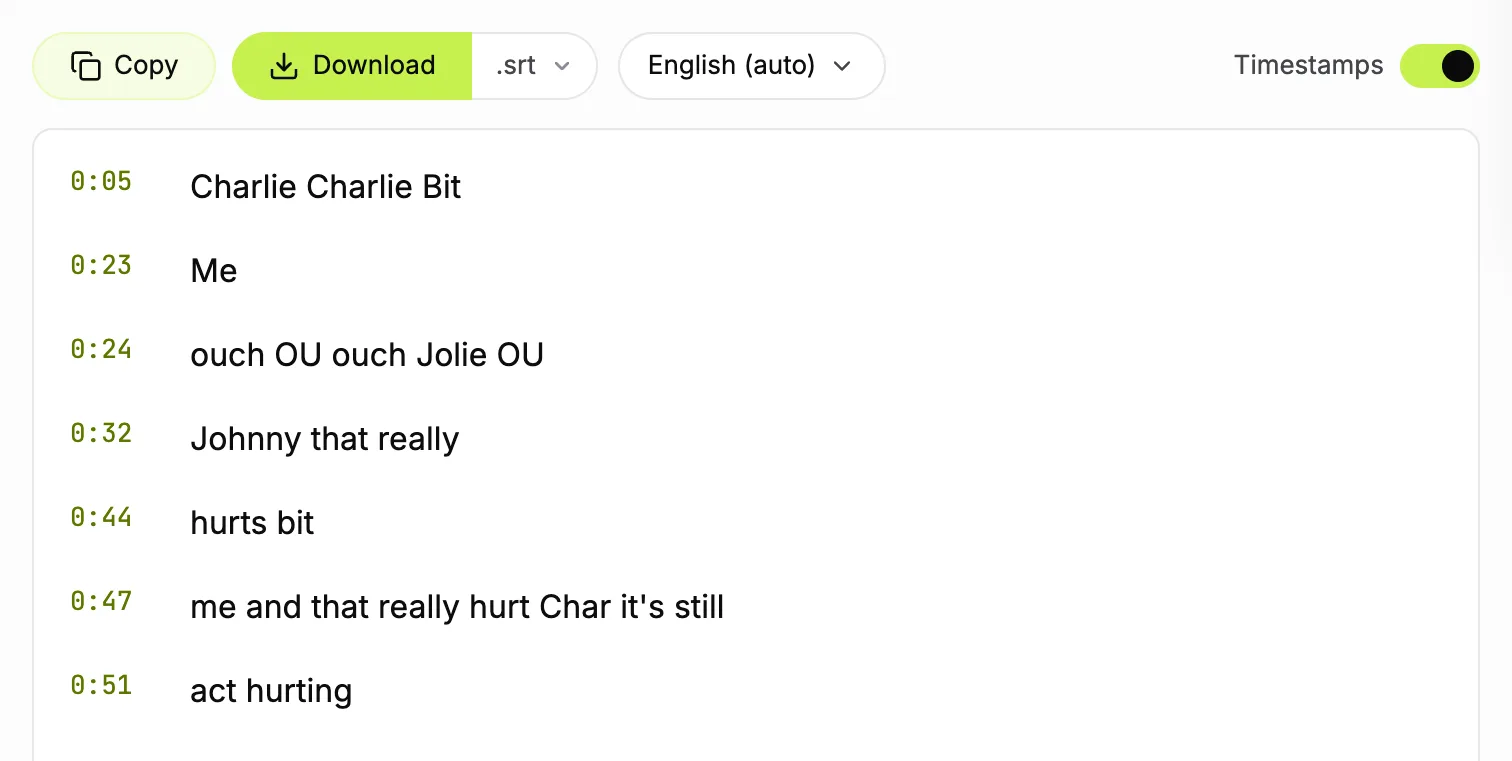
Screenshot: TranscriptYou with .srt selected next to Download and the auto-generated English track. -
Open the file
The file is named after the video ID.
For your own video, YouTube Studio downloads the caption file from its Subtitles page: see how to download YouTube subtitles.
Turn a YouTube video's captions into an SRT file
Paste the link and download the caption track with its original timings. Free, no sign-up.
Time subtitles in a subtitle editor
Subtitle Edit and Aegisub show the audio waveform, so you time each block against the speech; they also renumber blocks after a split or merge.
How to edit an SRT file without breaking it
Fix wording in any text editor, but shift timing or split blocks in a subtitle editor, which renumbers the blocks and keeps the syntax valid. Keep at most two lines per block. The subtitle delay keys in VLC change playback only, not the file.
Before saving, check:
- a blank line after every block;
- a comma before the milliseconds;
- UTF-8 encoding;
- the .srt extension, with no .txt after it.
SRT vs VTT and other subtitle formats
SubRip is the most widely supported subtitle format; WebVTT adds styling and positioning for web players. The SRT format has no formal specification: the Library of Congress calls it not well standardized. For a YouTube video, see how to download YouTube subtitles in either format.
| Format | Extension | Timecode example | Styling and positioning | Where it is used |
|---|---|---|---|---|
| SubRip | .srt | 00:00:01,000, comma |
Not defined; simple tags depend on the player | Players, editors, YouTube uploads |
| WebVTT | .vtt | 00:00:01.000, full stop |
Yes: position, line, size, alignment, STYLE blocks | Web players, HTML5 <track> |
| SubViewer | .sbv | - | None | YouTube |
| ASS/SSA | .ass | - | Yes: override tags such as \pos and karaoke \k |
Subtitle editors, fansubs |
| TTML/DFXP | .ttml, .dfxp | - | Yes | Streaming, broadcast, YouTube |
| Plain text | .txt | None | None | Reading and quoting |
How to convert an SRT file to VTT, TXT or MP4
Converting to VTT or TXT is a text edit; converting to MP4 adds a subtitle track or burns the text into the picture. For WebVTT, add a WEBVTT line and a blank line on top and use a full stop before the milliseconds, as the W3C specification requires. For plain text, delete numbers and timecodes, or get a YouTube transcript as plain text.
For soft subtitles in an MP4, we ran this ffmpeg command on our export; it added a mov_text subtitle track without re-encoding the video:
ffmpeg -i video.mp4 -i subtitles.srt -c copy -c:s mov_text output.mp4MP4 timed text drops overlaps: extracting the track back cut each overlapping block at the next start. Burning in uses -vf subtitles=subtitles.srt, re-encodes the video and needs FFmpeg built with libass; ours lacked it, so we did not run it.
Need the text without timecodes?
Paste a YouTube link and copy the transcript as plain text or download it as .txt.
Why an SRT file is not working: common errors
Most SRT problems come from a broken file name, the wrong encoding or a timecode typo, not from the player:
- The player ignores the file: Windows hid a second extension (
subtitles.srt.txt); show extensions and rename it. - Garbled letters: the file is not UTF-8; save it again as UTF-8.
- A block is skipped or the upload rejected: a full stop instead of the comma, or no hours; write
00:01:02,500. - Two subtitles merged: the blank line is missing; add it.
- Subtitles drift: the file was timed for another cut or frame rate; shift or stretch the timings in a subtitle editor.
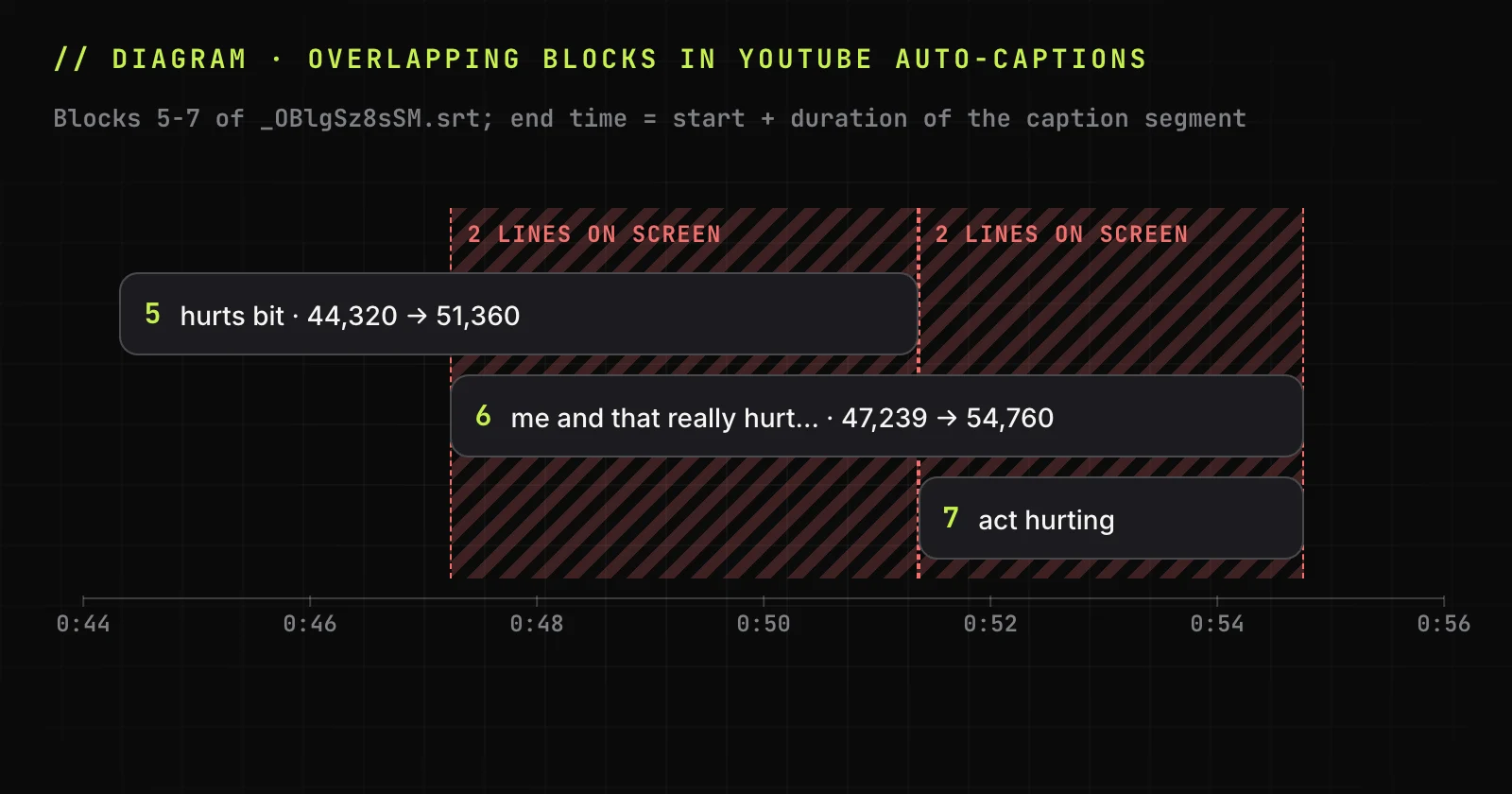
- Two lines at once: blocks overlap in time; trim each end to the next start.
Overlaps come with YouTube's automatic captions. In our export, 3 of 6 neighbouring block pairs overlap: block 5 ends at 51.360 seconds, block 6 starts at 47.239, so both lines show for 4.1 seconds, because each block ends at its start plus the duration YouTube reports.
If a file from a YouTube video is beyond repair, convert a YouTube video to SRT again.
When this does not work
TranscriptYou reads only caption tracks a public YouTube video already has, saves SubRip or plain text but not VTT, and keeps YouTube's timings, overlaps included. It does not transcribe audio.
SRT file FAQ
Is an SRT file a video?
No. SRT files hold only text and timecodes, so they weigh a few kilobytes: our seven-block export is 356 bytes. To watch them, you also need the video.
Can I open an SRT file on my phone?
Yes. A phone's files app or any text viewer shows the blocks, because the file is plain text. To watch a video with its subtitles, use a player that loads subtitle files: VLC media player has apps for Android and iOS.
Can I upload an SRT file to YouTube?
Yes. In YouTube Studio, open Subtitles, choose the video and language, and upload the file with timing. YouTube Help lists SubRip among the supported caption formats. Our guide on how to add subtitles to a YouTube video has the steps.
How many characters should an SRT line have?
No formal specification sets a limit. Platform style guides set the practical one: Netflix's English Timed Text Style Guide allows 42 characters per line and two lines per subtitle at most.
Can an SRT file change subtitle color or position?
Only partly. Some players read <font color> tags in SRT files, others ignore them, and YouTube ignores the markup. For reliable styling and placement, use WebVTT, which has cue settings for position and alignment, or ASS, whose override tags such as \pos set exact coordinates.
Are SRT files safe to download?
Usually. SRT files are plain text, but players parse them, and parsers can have bugs. In May 2017 Check Point Research showed crafted subtitle files taking over VLC, Kodi, Popcorn Time and Stremio, about 200 million players by its estimate. Update your player and use sites you trust.
Convert a YouTube video to SRT
Paste a link and save the subtitle track as an .srt file with the original timings. Free, no sign-up.
Sources
- Library of Congress: SubRip Subtitle format (SRT)
- W3C: WebVTT, The Web Video Text Tracks Format
- YouTube Help: Supported subtitle and closed caption files
- Aegisub: ASS Override Tags
- VLC User Documentation 3.0: Subtitles
- Apple: TextEdit User Guide, Work with HTML documents (Make Plain Text)
- FFmpeg Filters Documentation: subtitles
- Netflix: English (USA) Timed Text Style Guide
- Check Point Research: Hacked in Translation, from Subtitles to Complete Takeover (2017)